How can I update Price of my listing?
To change the price of your listing, follow these steps on your Houzeo Mobile App:
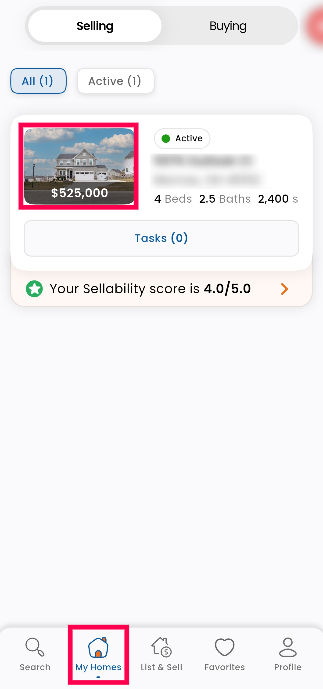
1. Login to your Houzeo Mobile App and click on 'My Homes" and click on your properties"Primary Image."
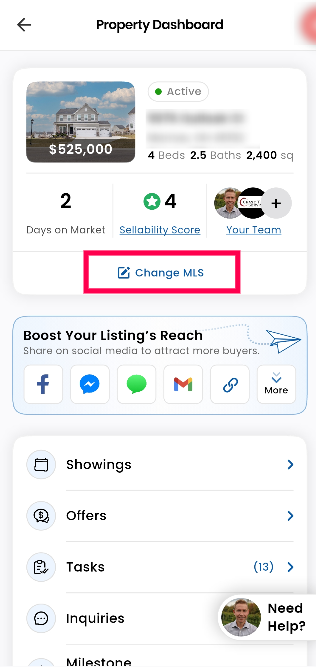
2. Click on 'Change MLS'.
3. Click on "Price" listing change option to change Price.
1. Login to your Houzeo Mobile App and click on 'My Homes" and click on your properties"Primary Image."
2. Click on 'Change MLS'.
3. Click on "Price" listing change option to change Price.
4. Enter new list price, and then click on "Next".
NOTE: Please check the revised price to make sure it is accurate. By moving on to the next step, you acknowledge that the price change you requested was not made inadvertently and you give your listing agent permission to implement it.
5. To complete the process, provide an e-text signature by typing your name exactly as it appears below the signature field (remember that it is case-sensitive).
Once you have signed the amendment request, click on "Submit Amendment". This will create an amendment task that will be reviewed by your listing agent within 24 - 48 Business Hours.
Alternatively, you can also update the "Price" on your Houzeo Web Dashboard by following the steps below:
Step 1: Click on the "Change MLS Listing" option.
Step 2: Click on "Price" option to update the list price of your property.
Step 3: Enter new list price, and then click on "Continue to Step 2".
NOTE: Please check the revised price to make sure it is accurate. By moving on to the next step, you acknowledge that the price change you requested was not made inadvertently and you give your listing agent permission to implement it.
Step 4: To complete the process, provide an e-text signature by typing your name exactly as it appears below the signature field (remember that it is case-sensitive).
Once you have signed the amendment request, click on "Submit Amendment". This will create an amendment task that will be reviewed by your listing agent.
By following these steps, you can easily update the price of your property. If you have any questions or need assistance, feel free to reach out here.

If your listing status is "Listing Docs Pending," please ensure that you complete the required documents assigned to you. Once you have completed the documents, you will gain access to the "Change MLS Listing" option.

Some MLS do not allow a price change of less than $1000 and more than 10% of the current listed price. Make sure that you check the specific guidelines of your local MLS board.
Related Articles
My property is listed, can I request a change in the listing?
Yes, you can request changes to your listing, whether it be price, photos, description, or add an open house or virtual tour easily using your Houzeo Mobile App. To request changes, you can follow the steps below: Open the Houzeo Mobile App and go to ...How can I change the closing date on the MLS through the Houzeo Dashboard?
You can change the closing date on MLS by following the simple steps below: Houzeo mobile App Step 1: Log in to your Houzeo account on the mobile app and tap My Homes at the bottom. Step 2: Click on your property address. Step 3: Tap the 'Change MLS ...How can I modify any other information in my listing?
You can make changes to any information of your listing apart from Price, Photos, Property Description, Open House details, Virtual Tour, and MLS Listing Status by following the steps below by using: Houzeo Mobile App Step 1: Log in to your Houzeo ...How can I update the property description?
To update the Property Description of your listing, follow these steps Houzeo Mobile App 1. Login to your Houzeo Mobile App and click on 'My Homes" and click on your properties"Primary Image." 2. Click on 'Change MLS'. 3. Click on "Property ...Can I make changes to my listing once it is active?
Yes! You can make unlimited changes to your property details even after your listing is active on the MLS. How to Update Your Listing: Log in to your Houzeo Dashboard. Select the "Change MLS Listing" option. Make the necessary updates and submit them ...